QIF to QFX converter
Current Quicken restricts what QIF can go into. QFX has no such limits, and the transactions are the same either way.
Free, no accountNothing is uploadedNo file size limit
Drop your .qif file here
or click to choose a file · nothing is uploaded
Which column is which
A CSV does not say what its columns hold, so these are worked out from the file. Correct any that came out wrong and the download updates.
Two amount columns means the first is money out and the second money in. Leave the second as none when one column carries its own minus signs. Date order is detected from the file, and can only be detected when at least one date falls after the 12th: set it by hand if every date in your file is early in the month.
Account details
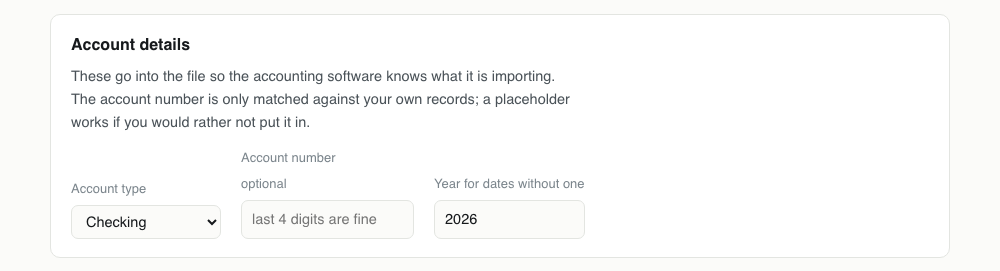
These go into the file so the accounting software knows what it is importing. The account number is only matched against your own records; a placeholder works if you would rather not put it in.
Converting QIF to QFX, step by step
1Start from the QIF your old software exported
These usually come out of an archive: an old Quicken file, an MS Money export, or a bank that never modernised its download page. Any of them work, and so does a QIF you have edited by hand.

2Drop it in
The header line decides the account type, so !Type:CCard arrives as a credit card and !Type:Bank as a checking account. The payees, memos, cheque numbers and amounts are read straight from their lettered lines.
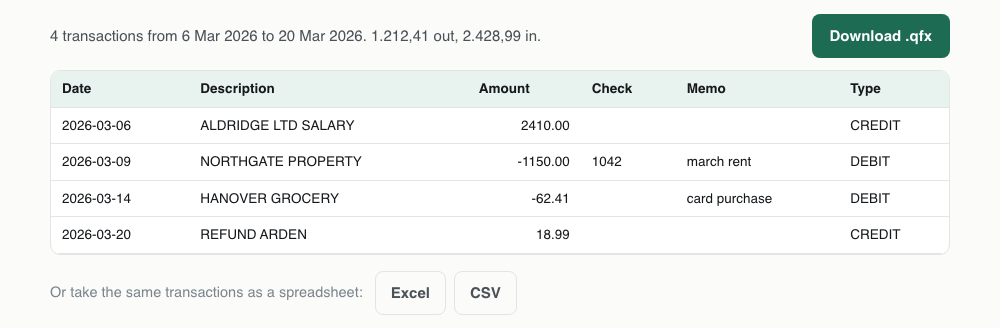
3Check the dates in the preview
Every date is rendered as YYYY-MM-DD. Find a transaction whose real date you know and confirm the day and month are not swapped. QIF is the one format where this genuinely cannot be settled from the file in every case.
4Download the .qfx
The output has fields the input did not: an id per transaction, an account block and a currency. None of them are invented, but the QFX is now the richer file and it is the one worth keeping.

One QIF transaction, and the QFX it becomes
The account block at the top of the output is new: the QIF header said credit card, so the QFX declares one.
!Type:CCard
D03/14/26
U-62.41
PHANOVER GROCERY
^<CCACCTFROM>
<ACCTID>000000000
</CCACCTFROM>
<STMTTRN>
<TRNTYPE>DEBIT
<DTPOSTED>20260314120000
<TRNAMT>-62.41
<FITID>202603146241HANOVERGROC
<NAME>HANOVER GROCERY
</STMTTRN>What survives QIF to QFX
Read this one the other way round from the rest. The output is richer than the input, and the QFX is now the file to archive.
| Field | What happens to it | |
|---|---|---|
| Date | Kept | Two digit years become 20xx; the apostrophe notation is read as well |
| Payee | Kept | The P line becomes NAME |
| Memo | Kept | The M line becomes MEMO |
| Amount | Kept | The U line is treated as equivalent to T, which is what newer QIF writers emit |
| Account type | Kept | !Type:CCard produces a credit card block rather than a bank block, as in the sample |
| Transaction id | Rebuilt | Gained rather than lost: the QIF had none and the QFX needs one, so it is generated |
| Categories | Lost | Dropped. Quicken applies its own category rules on import |
Importing the QFX into Quicken
File, then Import, then Bank or Brokerage File. Unlike a QIF, this will offer every account type including checking, savings and credit cards, which is the reason for converting in the first place.
Quicken matches on the transaction ids, so if you convert and import the same QIF again nothing is duplicated. That protection did not exist while the data was still in QIF form.
What QIF cannot do in current Quicken
Quicken still reads QIF, but only into certain account types: cash, asset and liability accounts, and not the checking, savings and credit card accounts most people are trying to fill. That restriction is deliberate and has been in place for years.
Converting to QFX removes the restriction, because QFX is the format Quicken's own bank downloads use. Same transactions, an envelope Quicken treats as first class.
You gain transaction ids
QIF has no field for a transaction id, which is the reason importing one twice duplicates everything. QFX has one, and it is filled here from each transaction's date, amount and payee.
The ids are deterministic: the same QIF converted twice produces the same QFX, byte for byte. So if you re-import, Quicken recognises the transactions and skips them, which the original QIF could never let it do.
Read the dates in the preview
QIF never fixed a date format, so files use 01/14/2026, 14/01/2026, 1/14/26 and Quicken's apostrophe form 1/14'26. All of them are read, and where the day and month are both 12 or under the file itself gives no way to tell them apart.
The preview shows every date as YYYY-MM-DD. Glance at a transaction you remember before downloading. It is the only check that catches a day first file being read month first.
The account block changes shape
This is visible in the sample above. A QIF that starts !Type:CCard produces a CCACCTFROM block in the QFX, while a bank account produces BANKACCTFROM with a routing number alongside the account id.
It matters because Quicken uses the block to decide what kind of register it is filling. A credit card imported as a bank account is not a display problem: the sign convention differs, and payments start behaving like deposits.
This is the one conversion that adds information
Everywhere else on this site the output holds the same as the input or less. Here it holds more, because QFX has fields QIF does not and they get filled: a transaction id per row, an account block, a currency.
None of it is invented from nothing. The ids come from the transactions themselves, the account type from the QIF header, the currency from a default you can see. But it is worth knowing that the QFX is now the fuller file, and it is the one to keep.
QFX problems, and what causes them
| What you see | Why | What to do |
|---|---|---|
| Quicken only offers cash and asset accounts for my QIF | That restriction is deliberate and applies to QIF import only. | This conversion is the way around it. A QFX can go into any account type. |
| Dates are a month out | A day first QIF whose dates all fall on or before the 12th, leaving no way to detect the order. | Edit the D lines in the QIF, which is plain text, and convert again. The preview will confirm the fix before you download. |
| The amount is doubled | The record carries both a T and a U line and something read them as two figures. | Not an issue here: whichever appears first is used and the other ignored. If you see doubling, it is in the source file rather than the conversion. |
| Card transactions have the wrong sign in Quicken | The QIF header said Bank when the account is really a card, so the file was written with a bank account block. | Override the account type to Credit card before downloading, regardless of what the header says. |
| An old file landed a century out | Two digit years are read as 20xx, so a 1997 file becomes 2097. | Write the years in full in the QIF before converting. It is one find and replace. |
QIF to QFX questions
- Why will Quicken not import my QIF into a checking account?
- Quicken restricts QIF import to cash, asset and liability accounts. Bank, credit card and investment accounts take QFX instead.
- Does converting QIF to QFX add anything that was not in the file?
- Only the transaction ids, which are derived from the date, amount and payee rather than invented, plus an account block built from the QIF's own type header.
- What happens to categories in the QIF?
- They are dropped. Quicken assigns categories on import based on its own rules, and a category from another program's file rarely matches one in yours.
- My QIF uses U lines instead of T for the amount. Is that a problem?
- No. Both are read, and a file carrying both is not double counted: whichever appears first in the record is used.