QIF to QBO converter
QIF is the format Quicken used before OFX, and plenty of banks still export it. QuickBooks stopped accepting it. This bridges the two.
Free, no accountNothing is uploadedNo file size limit
Drop your .qif file here
or click to choose a file · nothing is uploaded
Which column is which
A CSV does not say what its columns hold, so these are worked out from the file. Correct any that came out wrong and the download updates.
Two amount columns means the first is money out and the second money in. Leave the second as none when one column carries its own minus signs. Date order is detected from the file, and can only be detected when at least one date falls after the 12th: set it by hand if every date in your file is early in the month.
Account details
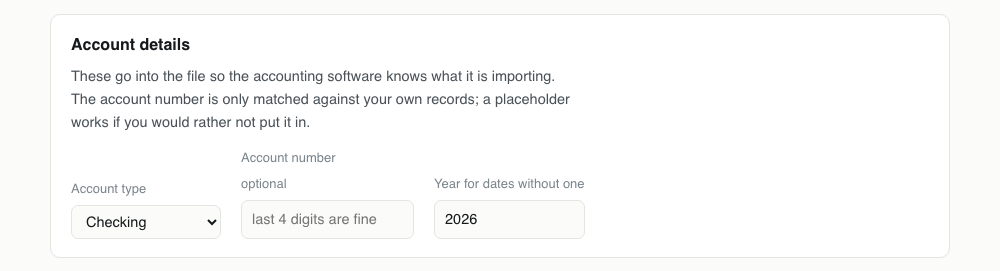
These go into the file so the accounting software knows what it is importing. The account number is only matched against your own records; a placeholder works if you would rather not put it in.
Converting QIF to QBO, step by step
1Open the QIF and look at the dates first
QIF is plain text, so rename it to .txt and read it before converting anything. The D lines are what matter: if you can see whether they are day first or month first, you already know whether the conversion will need correcting.

2Drop it in
The account type comes from the QIF's own header line, so a file starting !Type:CCard arrives as a credit card. The transactions are read in file order with their payees, memos and cheque numbers.
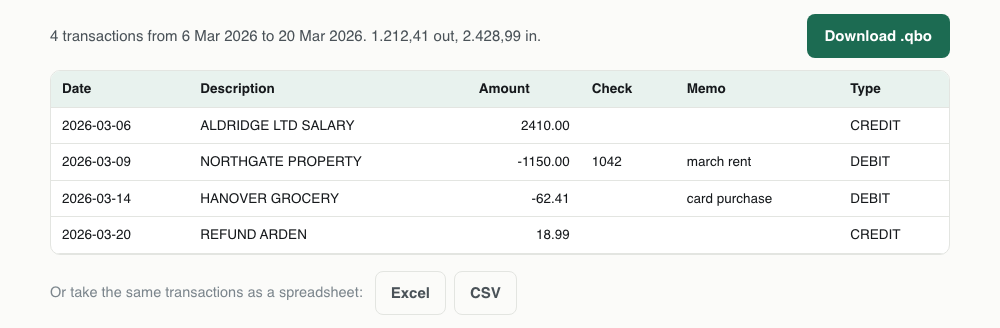
3Check the preview against what you read
Every date is shown as YYYY-MM-DD, which is the point of the preview. Find a transaction you recognise and confirm the day and month are the way round you expect. This is the only check that catches a European file being read as American.
4Download the .qbo
Each transaction gets an id built from its own date, amount and payee, which the QIF could not carry. That is the single biggest thing this conversion adds, and it is what makes the result safe to import more than once.

One QIF transaction, and the QBO it becomes
The QIF record on the left is four lettered lines. The QBO on the right is the same money with the structure QuickBooks needs around it.
!Type:Bank
D3/9'26
T-1,150.00
N1042
PNORTHGATE PROPERTY
Mmarch rent
^<STMTTRN>
<TRNTYPE>DEBIT
<DTPOSTED>20260309120000
<TRNAMT>-1150.00
<FITID>202603091150000NORTHGATEPRO
<CHECKNUM>1042
<NAME>NORTHGATE PROPERTY
<MEMO>march rent
</STMTTRN>What survives QIF to QBO
QIF is the poorest format here, so this conversion mostly adds. The one thing it cannot add honestly is a bank's own reference.
| Field | What happens to it | |
|---|---|---|
| Date | Kept | All four QIF date notations are read, including Quicken's apostrophe form |
| Payee | Kept | The P line becomes NAME |
| Memo | Kept | The M line becomes MEMO, which QuickBooks shows in its own memo column |
| Amount | Kept | Thousands separators removed; the T and U lines are treated as the same figure |
| Cheque number | Kept | The N line becomes CHECKNUM when it holds a number |
| Transaction id | Lost | QIF has no such field, so one is generated. This is the format's real weakness |
| Categories and splits | Lost | Dropped deliberately: they would not map to your chart of accounts |
Importing the QBO into QuickBooks
File, then Utilities, then Import, then Web Connect Files. QuickBooks will not offer QIF as an option at all in current versions, which is why the conversion is necessary rather than merely convenient.
Treat the first import as authoritative. The ids were generated from the transactions, so if you edit the QIF and convert again, the edited rows count as new transactions and will import alongside the originals.
QuickBooks dropped QIF on purpose
QIF has no transaction identifiers. Every other format carries a unique id per transaction, which is how software knows it has seen one before. A QIF has a date, an amount and a payee, and nothing else, so importing the same file twice imports everything twice.
That is why Intuit moved to Web Connect and why QuickBooks Desktop will not read a QIF at all in recent versions. It is also the one thing this conversion cannot fully fix: ids are generated from the date, amount and payee, which is stable enough that converting the same file twice gives the same file, but two genuinely identical transactions on the same day are told apart by position rather than by anything in the data.
The date problem, which is the real work
QIF never defined a date format. Files in circulation use 01/14/2026, 14/01/2026, 1/14/26, and Quicken's own notation for years after 1999, which puts an apostrophe where the separator should be: 1/14'26.
All four are read here. Where the day and month are genuinely ambiguous, the decision is made once for the whole file rather than row by row: if any date has a first part above 12 and none has a second part above 12, the file is read day first. That matters more than it sounds, because deciding per row is how a file ends up with half its dates in one order and half in the other, which survives every sanity check you might run afterwards.
If your file is European and every date in it happens to fall on or before the 12th, nothing in the file can settle it. Check the preview before downloading.
What comes across
Date, amount, payee, memo and cheque number. Categories and splits are dropped: QuickBooks assigns its own accounts on import and a category from Quicken would not map to anything in your chart of accounts.
The account type comes from the QIF header. A file starting with !Type:CCard is treated as a credit card, !Type:Bank as a checking account, and you can override either above.
Old files, and the year they land in
QIF is usually reached for when digging something out of an archive, which means two digit years and files older than the software reading them. A year written as 26 is read as 2026, which is right until it is not: a file from 1998 written with two digit years will land in the 2090s.
There is no way to tell from inside the file. If you are converting something genuinely old, look at the first row of the preview before downloading, and if the century is wrong the fix is to edit the years in the QIF, which is plain text and opens in any editor.
Importing the result
In QuickBooks Desktop: File, then Utilities, then Import, then Web Connect Files. QuickBooks matches on the transaction ids and reports how many it took and how many it skipped.
Because the ids in this file were generated rather than issued by a bank, treat the first import as the one that counts. If you convert the QIF again after editing it, the ids for edited rows will change and those rows will import as new.
QBO problems, and what causes them
| What you see | Why | What to do |
|---|---|---|
| QuickBooks has no QIF option in the import menu | Intuit removed QIF support from QuickBooks Desktop years ago, and QuickBooks Online never had it. | Convert to QBO here. There is no setting that brings the QIF option back. |
| Every date is in the wrong month | A day first file where every date happens to be on or before the 12th, so the file gives no clue about its own order. | The dates are decided once for the whole file rather than per row, so this is all or nothing rather than a mixture. Edit the QIF's D lines, or convert to QFX and let Quicken handle it. |
| A 1990s file lands in the 2090s | Two digit years are read as 20xx, which is right for recent files and wrong for genuinely old ones. | Open the QIF in a text editor and write the years in full. It is a find and replace on the D lines. |
| The categories from Quicken did not come across | They are dropped on purpose. A category from Quicken has no counterpart in your QuickBooks chart of accounts. | Categorise in QuickBooks after import, where the rules you set will apply to future transactions too. |
| A split transaction became one line | QIF splits are S, E and $ lines under a single record, and there is no way to express them in a bank statement style QBO. | The total is preserved, so nothing is lost financially. Re-split it inside QuickBooks if the breakdown matters. |
| Two identical transactions on one day became one | They did not: both are in the file, with a counter appended to the second id so QuickBooks keeps them apart. | Check the transaction count in the summary line against your own. If it matches, both are there. |
QIF to QBO questions
- Can QuickBooks import a QIF file?
- Not in current versions of QuickBooks Desktop, and not in QuickBooks Online. Converting to QBO is the supported route.
- Why does QIF cause duplicate transactions?
- Because the format has no transaction ids. Nothing in a QIF distinguishes a transaction you already imported from a new one, so the receiving software cannot deduplicate.
- Are categories converted?
- No. Categories are dropped on purpose: Quicken's category names do not correspond to your QuickBooks chart of accounts, and importing them would create accounts you did not ask for.
- What does the apostrophe in a QIF date mean?
- It is Quicken's way of writing a year after 1999. 1/14'26 is 14 January 2026. It is read here the same as any other date.