QFX to QBO converter
Your bank gave you a Quicken file and your books are in QuickBooks. The transactions inside are identical; only the wrapper has to change.
Free, no accountNothing is uploadedNo file size limit
Drop your .qfx file here
or click to choose a file · nothing is uploaded
Which column is which
A CSV does not say what its columns hold, so these are worked out from the file. Correct any that came out wrong and the download updates.
Two amount columns means the first is money out and the second money in. Leave the second as none when one column carries its own minus signs. Date order is detected from the file, and can only be detected when at least one date falls after the 12th: set it by hand if every date in your file is early in the month.
Account details
These go into the file so the accounting software knows what it is importing. The account number is only matched against your own records; a placeholder works if you would rather not put it in.
Converting QFX to QBO, step by step
1Find the QFX your bank issued
It is whatever you got from a download button labelled Quicken or Web Connect. The extension may be .qfx or .ofx; both work here, because the two are the same grammar and only the branding tag differs.

2Drop it in
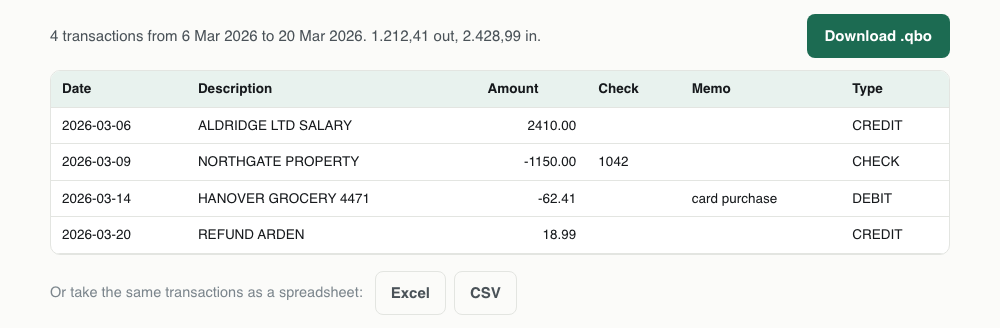
There is no column mapping on this one. A QFX states what every field is, so the transactions come out with their dates, amounts, payees, types and ids already identified, and the preview shows exactly what will be written.
3Confirm the account details it read
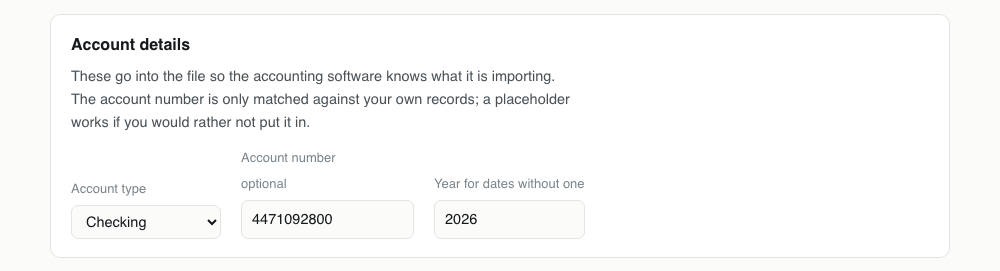
The account type and number are filled in from the file itself. Check the type in particular: the file says checking, savings or credit card, and if the bank issued the wrong one the sign convention in QuickBooks will be inverted.
4Download the .qbo
The file that comes out carries the same transaction ids as the QFX went in with. That is what lets you import it now and again later without QuickBooks duplicating anything.

One QFX transaction, and the QBO it becomes
Both files describe the transaction the same way, which is why this pairing is a rewrite of the wrapper rather than a translation.
<STMTTRN>
<TRNTYPE>CHECK
<DTPOSTED>20260309120000[-5:EST]
<TRNAMT>-1150.00
<FITID>0000012049921
<CHECKNUM>1042
<NAME>NORTHGATE PROPERTY
</STMTTRN><STMTTRN>
<TRNTYPE>CHECK
<DTPOSTED>20260309120000
<TRNAMT>-1150.00
<FITID>0000012049921
<CHECKNUM>1042
<NAME>NORTHGATE PROPERTY
</STMTTRN>What survives QFX to QBO
The rare case where nothing meaningful is lost. Worth reading anyway to see why the other pairings on this site cannot say that.
| Field | What happens to it | |
|---|---|---|
| Date | Kept | The timezone suffix is dropped; the posting date itself is untouched |
| Payee and memo | Kept | Carried across verbatim, including any ampersands the file escaped |
| Amount | Kept | Copied to the cent. Nothing is re-derived from a sign or a column |
| Transaction type | Kept | CHECK, ATM, POS and the rest of the OFX vocabulary survive as written |
| Transaction id | Kept | The bank's own FITID is reused, which is what makes a re-import safe |
| Cheque number | Kept | CHECKNUM is preserved, so QuickBooks fills its Num column |
| Branding tag | Lost | Replaced: the file stops identifying itself to Quicken and starts identifying to QuickBooks |
Importing the QBO into QuickBooks
File, then Utilities, then Import, then Web Connect Files in QuickBooks Desktop. Pick the account, and the transactions arrive in the Bank Feeds centre for review.
Because the ids came from your bank rather than being generated, they will also match an official QBO for the same period if you ever get one. This is the only conversion on the site where that is true, and it means you can switch between the two sources without creating duplicates.
Why renaming the file does not work
It is the first thing everyone tries, and it fails for a reason that is easy to miss: QFX and QBO are both OFX underneath, but each carries a tag naming the software it was licensed for. QuickBooks reads that tag before it reads a single transaction, and a file that does not identify itself correctly is refused as unsupported.
So the transactions really are interchangeable and the envelope is not. This rewrites the envelope: the file is read, every transaction is taken out with its date, amount, payee, type and id intact, and a new file is written with the header QuickBooks expects.
This is the highest fidelity conversion on the site
Both formats can hold the same fields, so nothing has to be dropped, inferred or rounded. Look at the two panels above: apart from the timezone suffix, the transaction is byte for byte the same on both sides.
That is unusual. Every other pairing here loses something, because the target format has no place to put it. Going from QFX to QBO the only thing that changes is which company's software will open the result.
The transaction ids are kept
Each transaction in a QFX carries a FITID, the bank's own unique reference for it. That id is what accounting software uses to recognise a transaction it has already seen, and it is why importing the same month twice does not usually duplicate anything.
The ids are carried across unchanged rather than regenerated. Convert the same QFX twice and you get byte identical files, so a second import is a no-op instead of a mess to unpick.
Set the account type before downloading
The file says whether it came from a checking account or a credit card, and that is read and filled in above. It is worth a glance, because a credit card statement written as a checking account inverts the meaning of every sign, and QuickBooks will import it without complaint.
The account number is read from the file too. Leave it as it came unless you are importing into an account set up under a different number.
If your bank charges for the QFX
Several do, either as a monthly Web Connect fee or by restricting the download to business accounts. The fee is a licence between the bank and Intuit, not a technical cost, and the same transactions are in the free CSV and PDF downloads.
So there is a cheaper route to the same QBO: take the free export and convert that instead. It is a slightly longer path because a CSV needs its columns identified, and it costs nothing.
QBO problems, and what causes them
| What you see | Why | What to do |
|---|---|---|
| QuickBooks rejects the original QFX but the extension looks right | QuickBooks reads the branding tag inside the file, not the extension. A QFX identifies itself to Quicken, so QuickBooks refuses it as unsupported. | That is what this page is for. Convert it and import the .qbo instead. |
| The converted file is also refused as an unsupported institution | This time it is the account binding: QuickBooks has already tied that account to a different bank's ids. | Set up a fresh account in QuickBooks and import into it, or check you picked the right account of the two. |
| Payments on a credit card appear as charges | The account type came through as checking when the file is really a card, which happens when a bank writes a generic account block. | Change the account type selector to Credit card before downloading. The account block in the file changes shape and the signs read correctly. |
| Some transactions are missing after import | QuickBooks skipped them because their ids are already in your books, usually from an earlier import of an overlapping period. | Check the register for those dates before assuming the file lost them. The conversion reports its own count, so compare that with the QFX. |
| Dates are a day out | The QFX carried a timezone suffix and something along the chain shifted it across midnight. | The suffix is dropped here and the posted date is used as written, so the converted file will be correct. If the original QFX was already shifted, that is your bank's doing and only they can fix it. |
QFX to QBO questions
- What is the difference between QFX and QBO?
- Almost nothing. Both are OFX with an Intuit branding tag: QFX identifies the file to Quicken, QBO to QuickBooks. The transaction data inside follows the same grammar in both.
- Can I just rename a .qfx to .qbo?
- No. QuickBooks checks the branding tags inside the file, not the extension, and rejects a renamed file as being from an unsupported financial institution.
- Will importing the converted file create duplicates?
- It should not. The original transaction ids are carried across, and QuickBooks matches on those, so a transaction already in your books is recognised and skipped.
- My bank charges for QFX downloads. Is there a way round it?
- Download the statement as a PDF or CSV, which banks give away, and convert that instead. Both routes are on this site and neither costs anything.
- Does an .ofx file work here too?
- Yes. OFX, QFX and QBO share one grammar, so a plain .ofx can be dropped in and will convert the same way.