QBO to PDF
Double clicking a .qbo either opens QuickBooks or opens nothing. This reads the file and lays the transactions out as a statement your browser can save as a PDF.
Free, no accountNothing is uploadedNo file size limit
Drop your .qbo file here
or click to choose a file · nothing is uploaded
Which column is which
A CSV does not say what its columns hold, so these are worked out from the file. Correct any that came out wrong and the download updates.
Two amount columns means the first is money out and the second money in. Leave the second as none when one column carries its own minus signs. Date order is detected from the file, and can only be detected when at least one date falls after the 12th: set it by hand if every date in your file is early in the month.
Account details
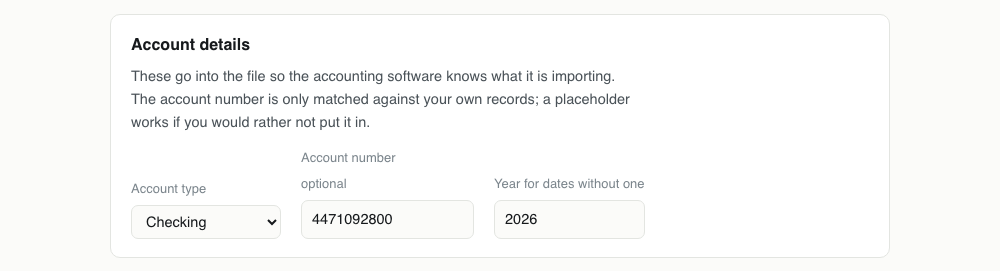
These go into the file so the accounting software knows what it is importing. The account number is only matched against your own records; a placeholder works if you would rather not put it in.
Converting QBO to , step by step
1Find the .qbo you cannot open
It came from a Web Connect download, or from a converter. Windows offers to open it with QuickBooks and nothing else; macOS usually offers nothing at all. The file itself is plain text, which is why this works without any software.

2Drop it in
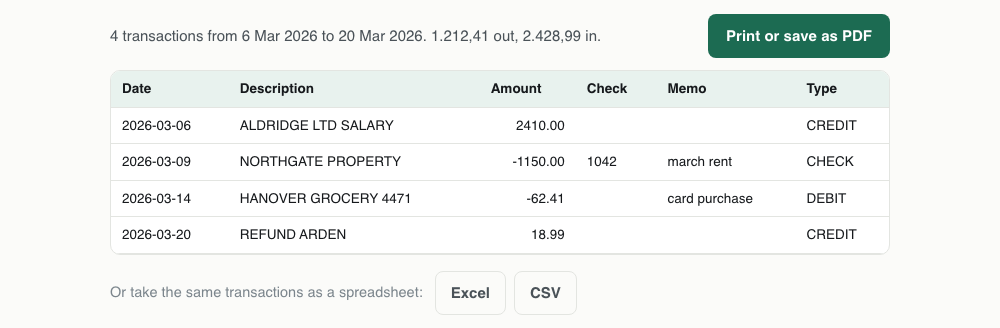
The transactions are read out with their dates, payees, amounts, cheque numbers and memos, and the account details the file declares are filled in above. A .qfx or a plain .ofx works here too: all three are the same format underneath.
3Check the account line
The type and the account number come from the file and appear on the printed statement's header. Correct them if the file was written badly, because they are what tells a reader which account the page describes.
4Print, and choose Save as PDF
The button opens your browser's print dialog against a clean A4 layout: no site header, no navigation, no buttons. In the destination list pick Save as PDF, or Microsoft Print to PDF on Windows, and you have a file you can send to someone.

One QBO transaction, and the it becomes
The file on the left is what your accounting software reads happily and you cannot. The line on the right is the same transaction after it has been laid out for a person.
<STMTTRN>
<TRNTYPE>DEBIT
<DTPOSTED>20260314120000
<TRNAMT>-62.41
<FITID>0000012049918
<NAME>HANOVER GROCERY 4471
</STMTTRN>Date Description Amount
14 Mar 2026 HANOVER GROCERY 4471 -62.41What survives QBO to
Nothing is thrown away here, because a printed page can show everything the file holds. What changes is only how it is arranged.
| Field | What happens to it | |
|---|---|---|
| Date | Kept | Printed in full, so there is no day and month ambiguity for whoever reads the page |
| Payee | Kept | The NAME field, in full rather than truncated to fit a column |
| Memo | Kept | Printed under the payee in smaller type when the file carries one |
| Amount | Kept | Right aligned with tabular figures so a column of them can be read down |
| Cheque number | Kept | Gets its own reference column |
| Closing balance | Kept | Taken from the file's LEDGERBAL when it declares one |
| Transaction id | Lost | Left off the page deliberately: it is a machine reference and it makes the layout unreadable |
What you get, and what it is not
The page is a rendering of the transactions in the file: account type, the period covered, the number of transactions, totals in and out, the closing balance the file declares, and every row with its date, payee, reference and amount.
It is not a bank statement. It carries a line saying so, on purpose. A statement is a document your bank issues and stands behind; this is a readable view of a data file, and anyone who needs proof of your finances needs the bank's own PDF rather than this one.
For working purposes it is often better than the bank's version: one line per transaction, no marketing inserts, and the same file will also come out as Excel or CSV from the buttons underneath.
Why a QBO cannot just be opened
A Web Connect file is a delivery mechanism, not a document. Your bank writes one so that QuickBooks can swallow a month of transactions in one go, and the format is built entirely around that: tags, ids, timestamps, and no layout at all.
So there is nothing to open. Rename it to .txt and you can read it, in the sense that the characters are legible, but four hundred lines of tags is not something anyone can check a payment against.
The two different things people mean by QBO
Accountants say QBO for QuickBooks Online, and the file extension .qbo is Web Connect. They are unrelated, and searching for one turns up answers about the other constantly.
This page is about the file. If what you want is a PDF of a report out of QuickBooks Online, that is inside the product: open the report, then Export, then Export to PDF. No converter is involved and nothing here will help.
Why print rather than generate a PDF file
Producing a PDF in a browser tab means shipping a PDF library, which is a megabyte or so of JavaScript to build something the browser already knows how to make.
Every browser can already print to PDF, with better typography and a proper A4 layout, so the button opens the print dialog against a clean document instead. Choose Save as PDF and the result is the same file you would have got, made by better code than this page could carry.
It is a view, not evidence
Worth being blunt about, because the difference matters to anyone on the receiving end. A bank statement is issued by a bank, carries its branding, and can be verified with the bank. What this page produces is a rendering of whatever file you gave it, and it says so in the footer of the page it prints.
If a landlord, a lender or a court has asked you for statements, download the PDFs your bank issues. If you are reconciling your own books, checking a payment, or sending a list of transactions to your accountant, this is the more useful document of the two.
Excel is usually the better answer
A PDF is for reading and sending. If you are going to do anything with the numbers, take the Excel or CSV download underneath instead: same transactions, sortable, and you can total a column.
The one case where the PDF wins is when someone else has to look at it and you do not want them editing it, or when it goes into a file alongside other paperwork.
problems, and what causes them
| What you see | Why | What to do |
|---|---|---|
| Double clicking the file opens QuickBooks and imports it | Windows associates .qbo with QuickBooks, and Web Connect files are meant to be imported rather than read. | Do not open it from the desktop. Drag it onto the box above instead, which reads the file without launching anything. |
| The print dialog has no Save as PDF option | You are on Windows without the built in PDF printer, or in a browser whose print destination list is collapsed. | Look for Microsoft Print to PDF in the destination list, or use See more to expand it. Chrome, Edge, Safari and Firefox all offer a PDF destination. |
| The printed page has the website header on it | It should not: the statement is printed from an isolated document rather than from this page. | If you are seeing site furniture, you used the browser's own File then Print on the page rather than the button. Use the button. |
| No transactions were found | The file is not really OFX. A .qbo produced by exporting a report from QuickBooks Online is not a Web Connect file and has a different structure. | Open it in a text editor. A Web Connect file starts with OFXHEADER or with an OFX tag. If yours does not, it is a report and QuickBooks itself can export it as PDF. |
| The closing balance is missing from the header | The file declares no LEDGERBAL, which happens with files written by simple converters. | Nothing to fix. The totals in and out are still calculated from the transactions, and they are the figures worth checking anyway. |
QBO to questions
- How do I open a QBO file without QuickBooks?
- Drop it on this page. The file is read in your browser and laid out as a statement you can read, print or save as PDF, and the transactions can also come out as Excel or CSV.
- Can I convert a QBO file to PDF?
- Yes, in the sense that matters: the transactions are laid out as a printable page and your browser's print dialog saves it as a PDF. No file is uploaded and no software is installed.
- Is the PDF a real bank statement?
- No, and the page says so in its footer. It is a readable rendering of the file's contents. For proof of income or funds, use the PDF statement your bank issues.
- Does this work with QFX and OFX files too?
- Yes. QBO, QFX and OFX share one grammar, so any of the three can be dropped in and printed the same way.
- How do I get a PDF of a report from QuickBooks Online?
- That is a different thing and it is inside the product: open the report, use Export, then Export to PDF. This page reads .qbo files, not QuickBooks Online reports.