CSV to OFX converter
Plain OFX, the open format, with no branding tag for QuickBooks or Quicken. For everything else that reads a bank feed.
Free, no accountNothing is uploadedNo file size limit
Drop your CSV here
or click to choose a file · nothing is uploaded
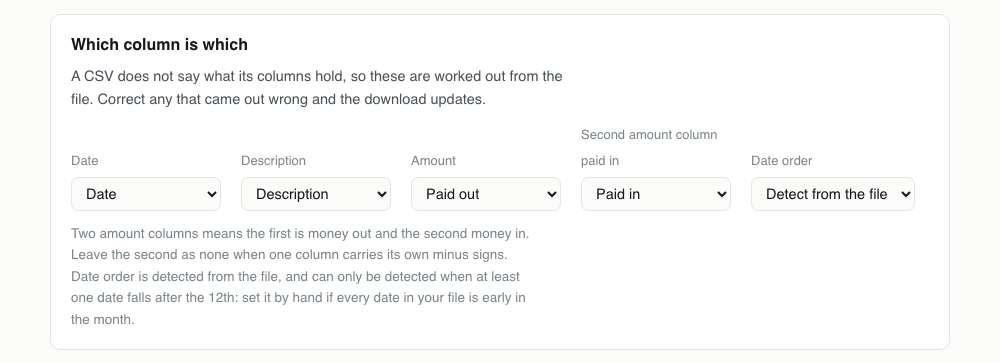
Which column is which
A CSV does not say what its columns hold, so these are worked out from the file. Correct any that came out wrong and the download updates.
Two amount columns means the first is money out and the second money in. Leave the second as none when one column carries its own minus signs. Date order is detected from the file, and can only be detected when at least one date falls after the 12th: set it by hand if every date in your file is early in the month.
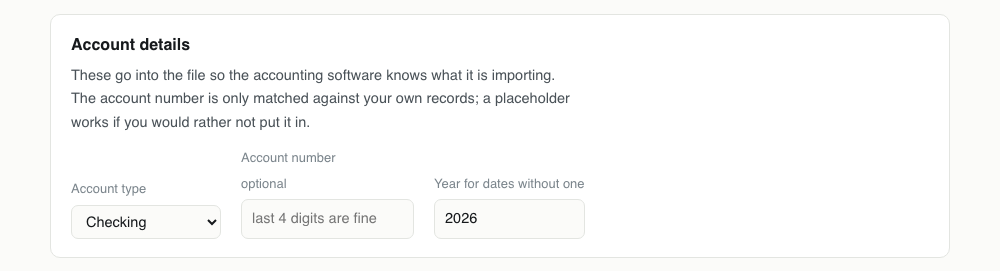
Account details
These go into the file so the accounting software knows what it is importing. The account number is only matched against your own records; a placeholder works if you would rather not put it in.
Converting CSV to OFX, step by step
1Confirm your software wants plain OFX
The distinction matters here more than anywhere else on the site. If the software is QuickBooks or Quicken it will reject a plain OFX, and you need the branded QBO or QFX instead. Everything else that reads bank feeds wants exactly what this page produces.

2Drop the CSV in and set the columns
Date, description and amount are detected and shown for correction. If your export splits money out and money in across two columns, set both, and the first is negated on the way through.
3Set the account type
Checking, savings or credit card. Unlike the Intuit formats, most OFX readers use this only to label the account rather than to change sign conventions, but getting it right still saves a conversation with the import wizard.
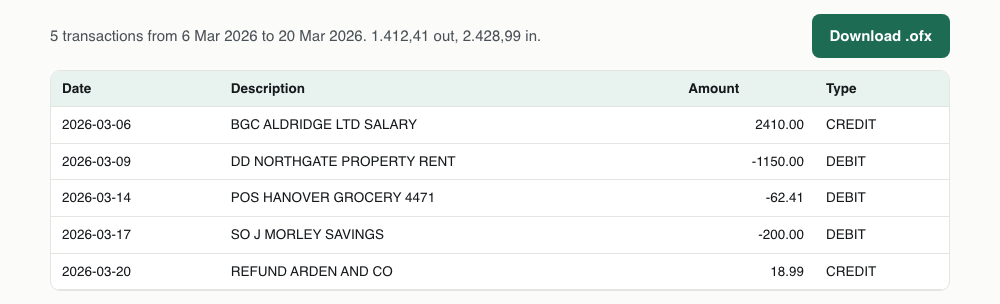
4Download the .ofx
What comes out is OFX 1.02 in SGML form, with no Intuit branding tag anywhere in it. Open it in a text editor if you want to see that for yourself: the SONRS block is where a QBO would carry INTU.BID and this file simply does not.
One CSV transaction, and the OFX it becomes
Note the ampersand in the payee: it goes, and the reason is a limitation of the format rather than a choice.
Date,Description,Amount
2026-03-20,REFUND ARDEN & CO,18.99<STMTTRN>
<TRNTYPE>CREDIT
<DTPOSTED>20260320120000
<TRNAMT>18.99
<FITID>202603201899REFUNDARDEN
<NAME>REFUND ARDEN CO
</STMTTRN>What survives CSV to OFX
The interesting row is the last one. A CSV cannot be trusted about balances, so none is declared rather than declaring a wrong one.
| Field | What happens to it | |
|---|---|---|
| Date | Kept | Written as an OFX timestamp at midday, which avoids timezone rounding across a date boundary |
| Description | Rebuilt | Angle brackets and ampersands are stripped: OFX 1.x has no escaping, so they would break the file |
| Amount | Kept | Signed, two decimals |
| Transaction type | Rebuilt | Inferred from the sign |
| Transaction id | Rebuilt | Generated and stable, so the same CSV converted twice produces the same ids |
| Branding tag | Lost | Deliberately absent. This is the whole difference between an .ofx and a .qbo |
| Balance | Lost | Written as zero: a CSV column of running balances is not reliable enough to declare as the closing balance |
Importing OFX into the software that reads it
GnuCash: File, then Import, then Import OFX/QFX. GnuCash matches the account from the file and remembers the mapping for next time.
Moneydance: File, then Import, and select the OFX. It will ask which account to file the transactions under.
Banktivity and MoneyWiz both take OFX from their own import menus and use the transaction ids to skip anything already present.
Firefly III and other self hosted tools generally accept OFX through an importer plugin rather than the main interface, and the plugin will want the account chosen up front.
Plain OFX, not a rebranded QBO
OFX is the open specification that QBO and QFX are both built on. The difference is a tag identifying the file to Intuit's software, which QuickBooks and Quicken require and everything else ignores or trips over.
This writes the file without that tag. If you are importing into QuickBooks or Quicken you want one of the branded formats instead: they are on this site too, and a plain OFX will be refused by both.
What reads plain OFX
GnuCash, Moneydance, Banktivity, KMyMoney, Firefly III, MoneyWiz, and most self hosted personal finance software. Several bookkeeping packages outside the US accept OFX as their standard import.
Some of them accept QFX as well, by ignoring the extra tag. If yours does, either file works and it makes no difference which you pick.
Structure is what you gain over a CSV
A CSV is a table and the receiving software has to be told what each column means, every time. An OFX states it: this field is the posted date, this is the amount, this is the payee, this is the type, and this id is unique to this transaction.
That last part is the practical gain. Transactions get ids generated from their date, amount and payee, which are stable across conversions, so re-importing the same file is a no-op rather than a duplicate month.
Why the payee loses its punctuation
Look closely at the sample above: the ampersand in the payee is gone. OFX 1.x is SGML with no escaping mechanism at all, so a literal angle bracket or ampersand inside a value ends the value early and corrupts everything after it.
Rather than write a file that some readers cope with and others reject, those three characters are replaced with spaces. It is a small cosmetic loss in exchange for a file that parses everywhere.
Which OFX version this writes
OFX 1.02, the SGML form. It looks wrong to anyone expecting XML, because leaf tags are never closed, and that is correct: closing them produces a file that most desktop finance software rejects.
OFX 2.x exists and is real XML, but support for it outside of bank servers is thin. If your software specifically asks for OFX 2, it will also tell you so, and that is a rare enough case that it is not offered here.
OFX problems, and what causes them
| What you see | Why | What to do |
|---|---|---|
| QuickBooks or Quicken rejected the file | Working as intended. Both check for the Intuit branding tag, which a plain OFX does not carry. | Use the CSV to QBO page for QuickBooks or the CSV to QFX page for Quicken. |
| The importer complains that the XML is malformed | It is expecting OFX 2.x. This file is OFX 1.02, which is SGML: leaf tags are never closed, and an XML parser reads that as broken. | Look for an OFX 1 or legacy option in the importer. Most desktop finance software prefers 1.02, which is why it is what gets written. |
| The payee lost an ampersand or a bracket | OFX 1.x has no escaping, so those characters would end a value early and corrupt the rest of the file. | Nothing to fix in the file. Edit the payee after import if the exact string matters. |
| The closing balance shows as zero | A CSV cannot be trusted to state a balance, so none is declared rather than declaring a wrong one. | Most importers ignore the declared balance and compute their own from the transactions. If yours insists, edit the BALAMT line, which is plain text near the end of the file. |
| Re-importing added everything twice | The ids are stable for an unchanged CSV, so this points at the CSV having changed between conversions, even by a whitespace edit. | Convert from the original export each time rather than from a copy you have been editing. |
CSV to OFX questions
- What is the difference between OFX and QFX?
- QFX is OFX plus a tag identifying the file to Quicken. The transactions are the same. Quicken requires the tag; other software does not care or actively prefers it absent.
- Will this OFX import into QuickBooks?
- No. QuickBooks checks for the Intuit tag and rejects a plain OFX as being from an unsupported institution. Use the CSV to QBO converter for QuickBooks.
- Which OFX version does it write?
- OFX 1.02, which is the SGML form and the one nearly everything accepts. OFX 2.x is XML and is far less widely supported by desktop finance software.
- Why is the closing balance zero in the file?
- Because a CSV cannot be trusted to state one. A balance column may be running, may be per account, or may not be a balance at all, and declaring the wrong closing figure is worse than declaring none.